60% vs 75% vs 80% vs Full-Size Keyboards: Which Layout Fits Your Setup in 2026?
By ds · 2026-10-15
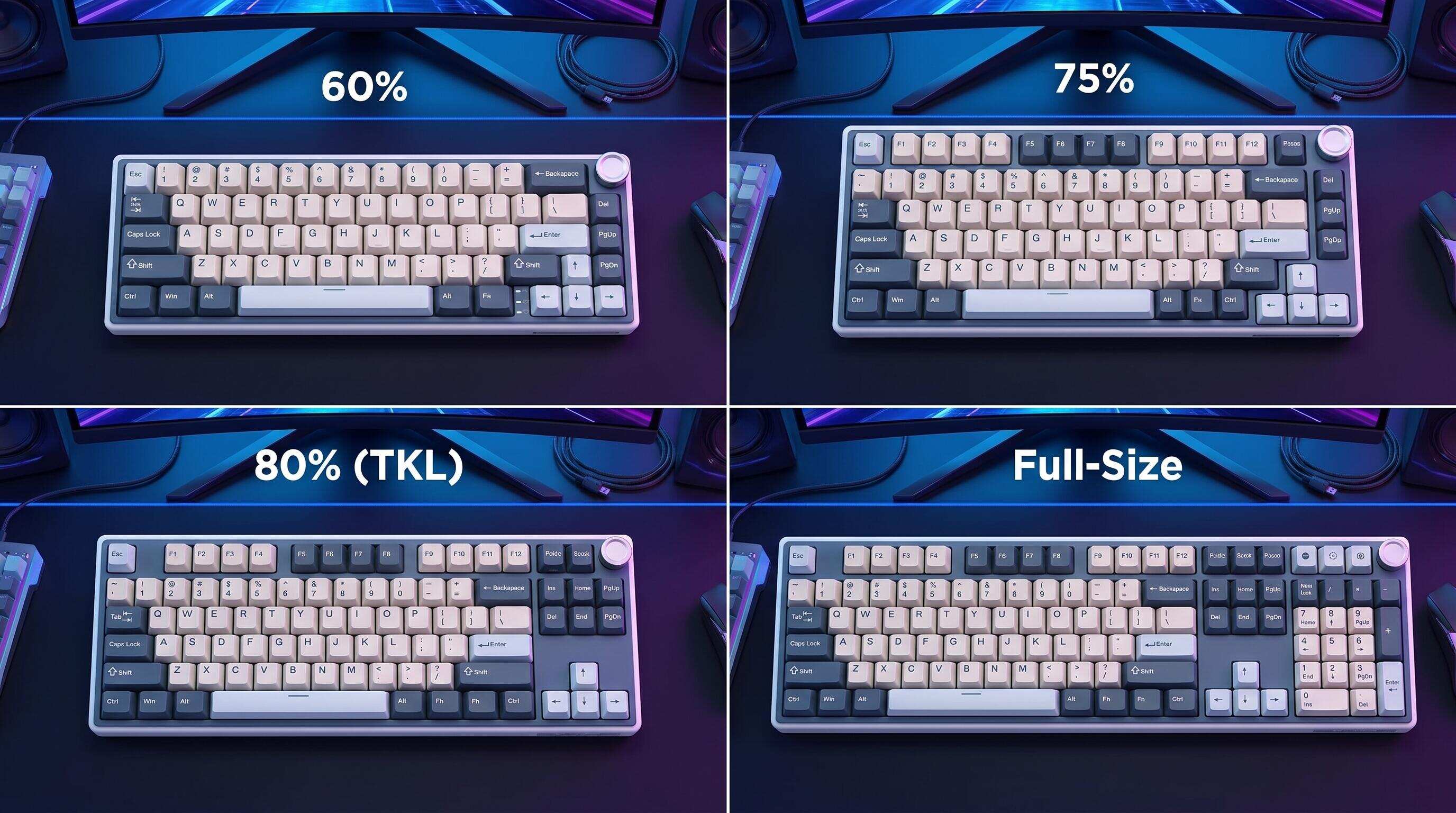
ALT: 60% vs 75% vs 80% vs full-size keyboard layout comparison for gaming setups in 2026
Which Keyboard Layout Actually Fits Your Setup? A Practical Guide to 60%, 75%, 80%, and Full-Size Keyboards
You sit down at your desk, unbox a compact 60% keyboard a friend recommended, and immediately realize your arrow keys are gone — along with the function row, the numpad, and half the shortcuts your workflow depends on. Or maybe you just upgraded to a sleek ultrawide monitor, and now your full-size keyboard looks cartoonishly oversized next to it. Sound familiar? Choosing the right keyboard layout in 2026 is one of the most consequential decisions you can make for your gaming and productivity setup, yet it rarely gets the nuanced treatment it deserves.
This guide breaks down the four most popular keyboard form factors — 60%, 75%, 80% (tenkeyless), and full-size (100%) — across every dimension that matters to gamers, streamers, and power users: desk footprint, ergonomics, feature access, portability, and long-term comfort. The layouts here were selected because they represent the dominant choices in the enthusiast and competitive gaming community, and together they cover the full spectrum from ultra-minimalist to fully featured. Whether you are building your first custom mechanical setup or upgrading from a stock board, this breakdown gives you a clear framework to make the right call.
Breaking Down Every Major Keyboard Layout — 60%, 75%, 80%, and Full-Size Explained
The 60% Keyboard: Maximum Minimalism, Minimum Desk Footprint
A 60% keyboard is a compact form factor that retains only the core alphanumeric keys, modifiers, and a handful of essential shortcuts, eliminating the function row, arrow keys, and navigation cluster entirely. The result is a board that occupies roughly 60% of the horizontal space of a full-size keyboard. In practice, what you get is an extraordinarily clean desk aesthetic and a mouse hand that sits much closer to the typing position — a setup many competitive FPS players swear by for the extra mouse travel it unlocks.
The trade-off is that functions like F1–F12, arrow keys, and Delete all live behind a function layer, meaning you hold a dedicated key (usually Fn) and press another to trigger them. This becomes second nature after a few weeks of practice, but the initial learning curve is real. At Royal Kludge, we consistently see new users underestimate how much their existing muscle memory is tied to dedicated keys — and how long it takes to rewire those habits.
- Best for: Competitive FPS and MOBA gamers who want maximum mouse space, minimalist desk aesthetics, and portability above all else.
- Watch out: The complete absence of dedicated arrow keys and a function row makes 60% layouts genuinely uncomfortable for coding, spreadsheet work, or any productivity task that relies heavily on navigation keys.
The 75% Keyboard: The Sweet Spot Between Compact and Functional
A 75% keyboard is a compact layout that keeps the function row (F1–F12) and arrow keys intact, while still cutting the numpad and compressing the navigation cluster (Home, End, Page Up, Page Down) into a single tight column along the right edge. The total size comes out significantly smaller than a tenkeyless board, but the key coverage feels dramatically more complete than a 60%.
For gaming, the 75% hits a rare balance point: you get the tactile comfort of dedicated arrow keys for games that use them, the function row for in-game macros and system shortcuts, and enough desk space freed up to give your mouse room to breathe. In our experience working with gamers who stream or multitask heavily, the 75% layout tends to be the one they settle on after going through the compact-to-full-size journey. It handles both gaming sessions and productivity windows without forcing you to fight your own keyboard.
- Best for: Streamers, hybrid gamers-workers, and anyone who wants a compact footprint without sacrificing functional keys they use daily.
- Watch out: The compressed right column (where navigation keys cluster) takes adjustment if you frequently use Home/End/Page Up/Page Down in quick succession — they are present but not in the positions most users expect.
The 80% Keyboard (Tenkeyless / TKL): The Enthusiast Standard
An 80% keyboard — universally known as tenkeyless (TKL) — is a layout that removes only the numpad from a full-size keyboard, retaining the function row, arrow keys, and the full navigation cluster in their standard positions. Nothing else changes. The result is a board that feels immediately familiar to anyone who has used a full-size keyboard, while freeing up substantial desk space to the right.
TKL is the most widely recommended layout in the mechanical keyboard enthusiast community for a reason: it offers zero compromise on key access while making a meaningful ergonomic difference. Removing the numpad brings your mouse hand measurably closer to your body's centerline, reducing shoulder strain during long sessions. For esports players and competitive gamers, this is often the minimum-acceptable compact layout — small enough to improve ergonomics, conventional enough that no habits need to change. The tenkeyless format has also become the dominant choice for pre-built gaming keyboards from virtually every major brand.
- Best for: Gamers transitioning from full-size who want a better mouse position without learning new key layers, and professionals who regularly use arrow keys and function keys in their workflow.
- Watch out: If you work with financial data, accounting software, or any number-heavy application, the missing numpad will slow you down noticeably — there is no workaround beyond a separate numpad peripheral.
The Full-Size (100%) Keyboard: Complete Key Coverage, No Compromises
A full-size keyboard, also called a 100% layout, is the traditional keyboard form factor that includes every key category: alphanumerics, function row, navigation cluster, arrow keys, and a dedicated numpad on the right. Every key has its own physical position — no function layers, no key sharing, no compromises on access.
Full-size boards remain the default in office environments for good reason: the numpad alone dramatically speeds up numeric data entry, and having every key at your fingertips without a second thought reduces cognitive overhead. For gamers, however, the picture is more complicated. The numpad pushes the keyboard significantly to the left of center (relative to the monitor), which pushes the mouse further right, forcing the right arm into an extended, sometimes awkward position. Over long gaming sessions, this is a known ergonomic concern. That said, if your gaming is casual and your workload is data-heavy, a full-size board is the most versatile single tool you can own.
- Best for: Data entry professionals, spreadsheet-heavy users, sim gamers who use numpad bindings (flight sims, strategy games), and anyone who values having every key physically present without exception.
- Watch out: The wide desk footprint and rightward mouse displacement make full-size keyboards a genuine ergonomic liability for high-intensity gaming sessions — especially in FPS titles where mouse positioning is critical.
Quick Comparison at a Glance
Here is a direct comparison of the four keyboard layouts across the metrics that matter most for gaming and productivity setups.
| Layout | Key Count (approx.) | Best For | Key Strength | Core Limitation |
|---|---|---|---|---|
| 60% | ~61 keys | Competitive FPS gamers, minimalist setups | Maximum desk space, ultra-portable | No dedicated F-row, arrows, or navigation keys |
| 75% | ~84 keys | Streamers, hybrid work-gaming users | Compact with F-row and arrow keys intact | Compressed nav cluster takes adjustment |
| 80% (TKL) | ~87 keys | Enthusiast gamers, all-round users | Standard layout minus numpad, ideal ergonomics | No numpad — relevant for data-heavy work |
| Full-Size (100%) | ~104 keys | Data professionals, sim gamers | Every key present, zero learning curve | Wide footprint pushes mouse too far right |
The pattern we consistently observe: users who game more than four hours daily and also handle productivity tasks converge on either the 75% or the TKL layout. The 60% is a deliberate lifestyle choice that rewards commitment, and the full-size is the right pick when the numpad is a genuine workflow requirement rather than a comfort habit.
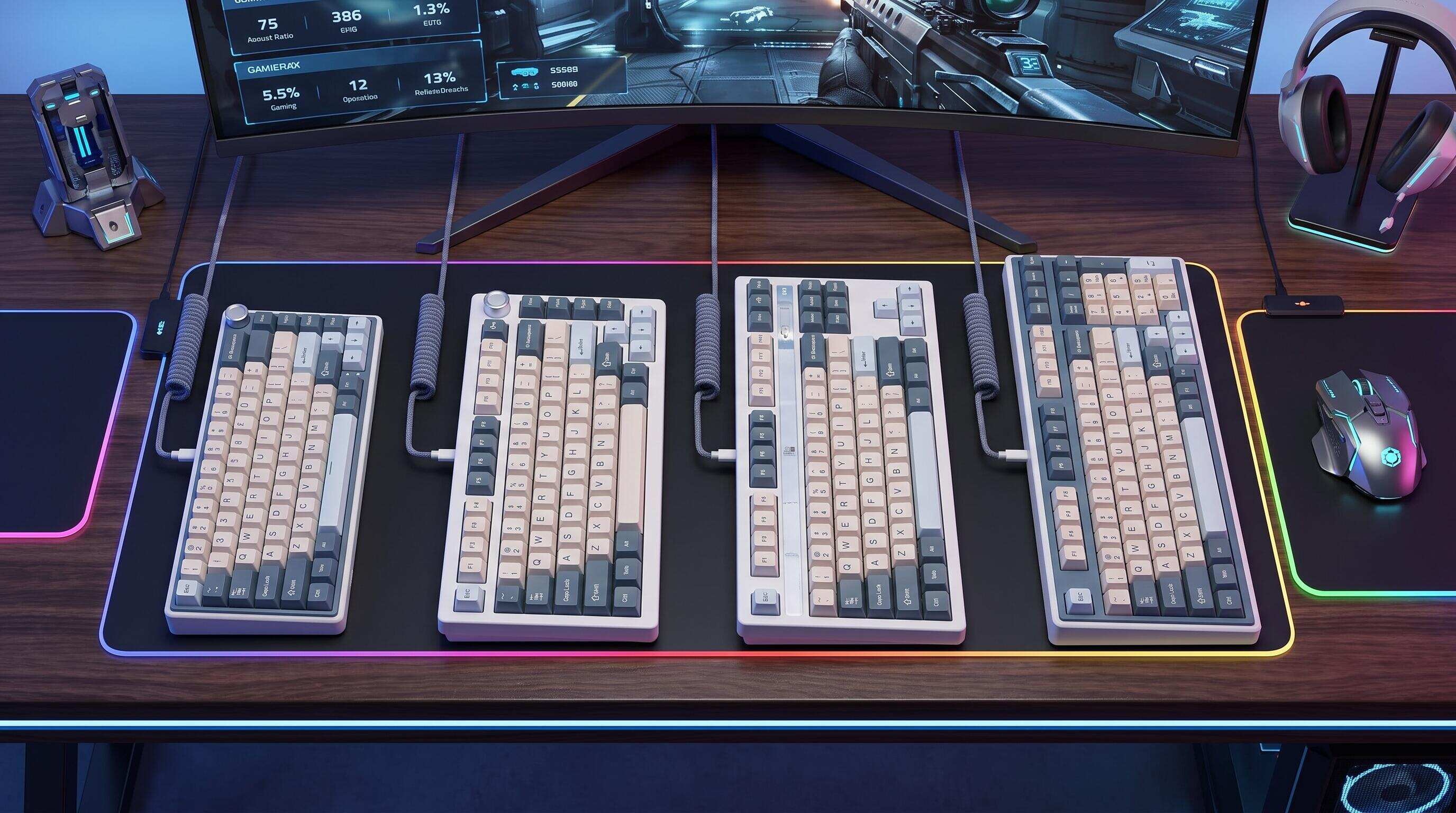
ALT: Side-by-side comparison of 60%, 75%, 80% tenkeyless, and full-size mechanical keyboards on a gaming desk setup, highlighting size differences and key layouts for 2026 buyers
How to Choose the Right Keyboard Layout for Your Setup
The right keyboard layout depends on three concrete factors: how you use your keyboard outside of gaming, how much desk space you can dedicate, and how willing you are to invest time in adapting to a new layout.
Start with an honest audit of your non-gaming keyboard use. If you enter numbers frequently — whether for accounting, coding, or spreadsheet navigation — the numpad question is your first decision gate. If the numpad is essential, full-size or a TKL-plus-separate-numpad solution is the practical answer. If you have never actually used the numpad in the past month, you probably do not need one.
Next, consider your mouse usage style. If you play FPS games at low DPI and use large, sweeping mouse movements, the desk real estate freed by a compact layout genuinely impacts your gameplay. A 60% or 75% board could give you a meaningfully wider effective mousepad area without any hardware change. If your DPI is high and your movements are small, the difference is less impactful.
Finally, be honest about your adaptation tolerance. A 60% keyboard will make you faster — eventually — but the first few weeks of hunting for arrow keys or accidentally triggering function layers mid-game can be genuinely frustrating. The TKL layout, by contrast, requires zero behavioral adaptation for anyone already accustomed to a standard keyboard. It is the layout we most often recommend as a first upgrade for this reason.
A common misconception worth clearing up: many people assume that smaller keyboards are inherently lower quality or less customizable. In practice, the compact form factor has driven significant innovation in the enthusiast keyboard market. Today, 60% and 75% layouts are available with premium switches, hot-swap sockets, gasket mounting, and per-key RGB — features that were once exclusive to larger boards. Choosing a compact layout is an aesthetic and ergonomic decision, not a quality compromise.
For gamers who want to explore both compact form factors and premium switch customization in a single package, Royal Kludge's full lineup of customizable mechanical keyboards covers every major layout with a focus on build quality and per-key configurability.
Frequently Asked Questions FAQ
Q1: How does keyboard layout choice affect gaming performance?
Keyboard layout affects gaming performance primarily through mouse positioning and desk ergonomics rather than through the keys themselves. A more compact layout — particularly 60% or 75% — moves the keyboard left and creates more mouse space to the right, allowing freer arm movement during gameplay. For high-intensity FPS titles, this can meaningfully reduce arm fatigue over long sessions. According to keyboard ergonomics guidance documented by occupational health researchers, reducing lateral reach during repetitive input tasks lowers cumulative strain on the shoulder and upper arm.
Q2: Is a 75% keyboard good enough for both gaming and office work in 2026?
A 75% keyboard is genuinely capable of handling both gaming and typical office productivity without significant compromise. It retains the function row (F1–F12), dedicated arrow keys, and a compressed navigation cluster — covering the vast majority of keyboard shortcuts used in browsers, productivity suites, IDEs, and game clients. The only meaningful gap is the absence of a numpad, which matters specifically for data entry and accounting tasks. For mixed-use setups where gaming and general computing share the same board, the 75% layout is one of the most well-rounded choices available in the current market.
Q3: How long does it take to adapt to a 60% keyboard layout?
Most users adapt to core typing on a 60% keyboard within one to two weeks of regular use. However, fully internalizing function-layer shortcuts — especially arrow keys and the F-row — typically takes three to six weeks of consistent daily use before the new key combinations feel as automatic as dedicated keys. The adaptation period is shorter for users who already touch-type and are comfortable with modifier key combinations. Users who rely heavily on arrow keys for coding or document editing will generally have a longer and more frustrating adjustment window than pure gamers.
The Bottom Line
Choosing between a 60%, 75%, 80%, and full-size keyboard layout is fundamentally a decision about trade-offs — desk space versus key access, portability versus convenience, minimalism versus completeness. There is no universally correct answer, but there are clear patterns for specific use cases.
Key Takeaways:
- The 60% layout maximizes desk and mouse space, but demands a real commitment to learning function layers — best for dedicated competitive gamers.
- The 75% layout is the most versatile compact form factor, balancing a reduced footprint with full function row and arrow key access — the top recommendation for hybrid gaming-productivity setups.
- The TKL (80%) layout offers the cleanest upgrade from full-size with zero behavioral adaptation required, making it the safest first step into compact keyboards.
- The full-size layout is the right choice only when a dedicated numpad is a genuine workflow requirement, not simply a comfort habit.
- Compact layouts are not a quality downgrade — today's 60% and 75% keyboards are available with the same premium features as any full-size board.
If you have been sitting on a full-size board out of habit rather than necessity, 2026 is a strong time to reassess. The compact keyboard market has never been more mature, and the options available at every price point are genuinely impressive. Identify the layout that matches your actual key usage patterns, give yourself a few weeks to adapt if needed, and your setup will thank you.
Ready to upgrade your gaming setup? Discover Royal Kludge keyboards and gaming peripherals designed to deliver responsive performance, reliable precision, and a clean, modern aesthetic. Explore the product details on Amazon UK and find the right addition to match your gaming style.
Sources & Citations
- RK Gaming Store. "60% vs 65% vs 75% Keyboard: Which Compact Layout Is Right for You?"
https://rkgamingstore.com/blogs/community/60-vs-65-vs-75-keyboard?srsltid=AU7gw4X25MTUconkLUvF3oLrpcc-iXc4TLL_kstYrIFN5VToXfRNgT0V - RTINGS.com. "Different Keyboard Sizes Explained: Full-Size vs 96% vs Tenkeyless vs More — Keyboard Size Guide."
https://www.rtings.com/keyboard/learn/keyboard-size-guide - Human Factors and Ergonomics Society (HFES). Standards and guidance on keyboard ergonomics and input device design for occupational and consumer contexts.
https://www.hfes.org/
Note: Standards and technical guidance may be updated; please consult the latest official documents or qualified ergonomics professionals for current recommendations.